
Initiate Workflow
In this section, you'll initiate the AI-DLC workflow on behalf of your development team. You'll experience how a team would collaborate through AI-DLC's methodology while working individually in this workshop.
For this workshop, the team will build a browser-based game 'Flappy Kiro Game' inspired by Flappy Bird, featuring Kiro (Amazon's AI mascot) navigating through obstacles.
1, Run the following subcommand in the IDE terminal to start an interactive, conversational chat session directly in your terminal. This feature is known as Kiro on the command line (Kiro CLI):
kiro-cliTo start the AI-DLC workflow, enter the following brief description about the 'Flappy Kiro' game in the Kiro CLI:
I want to build a Flappy Bird clone called Flappy Kiro.
Flappy Kiro is an arcade-style game in which the player controls a ghost called Ghosty, which moves persistently to the right. They are tasked with navigating Ghosty through a series of walls that have equally sized gaps placed at random heights.
Ghosty automatically descends and only ascends when the player taps the spacebar. Each successful pass through a pair of walls awards the player one point. Colliding with a wall or the ground ends the gameplay.
You will be greeted with a welcome message (similar to the below image) and a high-level overview of AI-DLC (which you already covered earlier in this workshop).
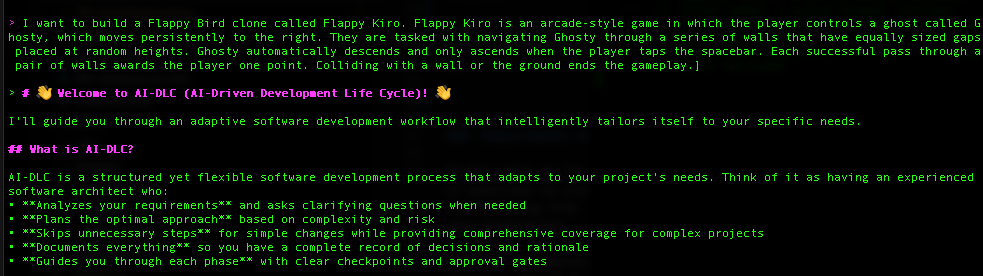
AI-DLC will guide you through an iterative, question-driven workflow to build your application. Take time to thoroughly review documentation created by AI-DLC to ensure it aligns with your business requirements.
Here's how it works:
1. AI Asks Strategic Questions
- AI will pose clarifying questions about requirements, architecture, and implementation details
- Questions are designed to gather the information needed for each phase (Inception → Construction → Operations)
2. The Team Provides Answers in Files
- AI will create files with
[Answer]:tags for the team to complete - Team answers guide AI's planning and code generation decisions
- This creates a permanent audit trail of all decisions made
3. AI Proposes Solutions
- Based on team answers, AI generates detailed plans, architectures, and code
- AI presents options and recommendations for team review
4. The Team Approves or Refines
- Team reviews AI's proposals and provides feedback
- Team approves to proceed or requests modifications
- AI iterates based on team guidance
5. Repeat Until Complete
- This cycle continues through all three phases
- Each iteration builds on previous team decisions
- AI maintains context and consistency throughout
- Audit Trail: AI creates an
audit.mdfile documenting all team activities and decisions - Permission Prompts: You'll see
Allow this action?when AI needs to execute commands - entertto trust for the session oryfor individual actions - File-Based Collaboration: AI uses structured files to capture team input and maintain decision history. The file-based approach with [Answer] tags creates a permanent audit trail that ensures proper documentation, team collaboration, and decision traceability throughout the software development lifecycle. This methodology promotes thoughtful consideration of each decision while enabling stakeholders to review, contribute, and maintain process integrity across requirements, planning, architecture, design, and code development phases.