
Connect to Kiro
In this section, you will connect to Kiro using an AWS Builder ID, which will allow access to certain developer tools and services from AWS without requiring an AWS account. AWS Builder IDs are free to use.
You can access details about your AWS Builder ID in AWS Builder ID profile page .
For this workshop we will use Kiro on the command line
- Run the following command in the IDE terminal:
kiro-cli login --use-device-flow- For Select login method, choose Use for Free with Builder ID.
- Holding the Command key (Mac) or Control key (windows), select the URL. Chose Open to open a new browser tab.
- For Authorization requested, choose Confirm and continue.
-
Choose Allow access.
-
The window will show Request approved. Close the tab and return back to your terminal.
-
Test you are connected using the following command:
kiro-cli whoamiThis workshop does not use the Amazon Q Developer extension for the IDE , however you can also enable it to provide additional Amazon Q Developer features. Refer to the Amazon Q documentation for more details.
-
In the navigation bar, select the Amazon Q icon.
-
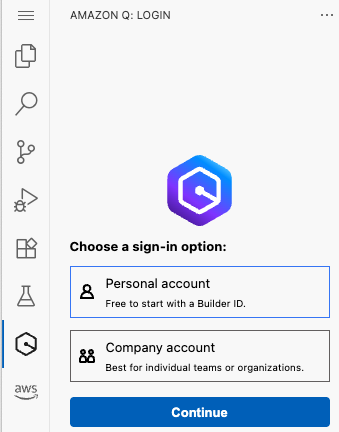
For Choose a sign-in option, select Personal account. Choose Continue.
- At the prompt Confirm Code for AWS Builder ID, choose Proceed to Browser.
- At the prompt Do you want code-server to open the external website?, choose Open.
- A browser tab will open displaying the Authorization requested page. The confirmation code should already be populated. Choose Confirm and continue.
- A browser tab will open displaying the Allow AWS IDE Extensions for VSCode to access your data? page. Choose Allow access.
- Close the tab and return to code-server tab.
You have configured your IDE and connected to Kiro on the command line.
Next you will briefly examine the files used in the workshop, before moving to the inception, construction and operation phases!